PREMIUM SQUAD CHEATS

Squad Cheats for PC. Aimbot, Player ESP, Object ESP & Gameplay Enhancements.

Checkout our Squad Cheats for PC featuring customizable Aimbot, Player ESP, Object ESP, and additional gameplay features. Improve targeting with adjustable FOV, smoothness, and bone selection, customize player and vehicle indicators, track HAB and FOB objects, and access additional combat and menu customization options.

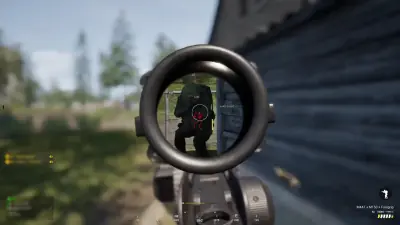
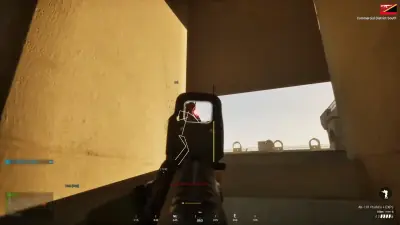
Squad gameplay with a targeting indicator at a window.

Yes

Stream-safe

<24h

Patch speed

300+

Users

24/7

Support

Custom FOV
Player ESP
Object ESP
Skeleton
Vehicle ESP
HAB / FOB
Config Manager
Windows 10 & 11
HVCI enabled
Core Isolation enabled
TPM enabled
Secure Boot enabled
Cloud DMA required for full functionality on supported builds
Custom FOV
Player ESP
Object ESP
Skeleton
Vehicle ESP
HAB / FOB
Config Manager
Windows 10 & 11
HVCI enabled
Core Isolation enabled
TPM enabled
Secure Boot enabled
Cloud DMA required for full functionality on supported builds

FEATURES

SQUAD Cheats with Custom Aimbot, ESP & Gameplay Options

Get more control over your SQUAD experience with customizable Aimbot, Player ESP, Object ESP, and gameplay enhancements. Adjust targeting settings, identify important objects, track player information, and personalize your setup through a range of configurable options.

Aimbot

Customizable Aim Assistance

Fine-tune your aiming settings with adjustable targeting controls, bone selection, and activation options.

  • Hold and toggle activation modes
  • Adjustable FOV radius with visible FOV border
  • Head, neck, body, and legs target selection
  • Custom keybind configuration
  • Adjustable aim smoothness
  • Maximum targeting distance

Player ESP

Detailed Player Information

Keep track of nearby players with customizable visual indicators that display important information directly on screen.

  • 2D and corner box ESP
  • Filled boxes with static and gradient styles
  • Health bars and health text
  • Player nicknames
  • Item currently held by players
  • Skeleton display
  • Distance-based rendering controls
  • Scope zoom value display

Object ESP

Locate Important Battlefield Objects

Identify important structures, vehicles, and objectives with configurable object indicators and additional information.

  • HAB base detection
  • FOB radio detection
  • Vehicle indicators
  • Object distance display
  • Category identification
  • Object health bars and text
  • Multiple health display styles

Gameplay Enhancements

Additional Combat and Movement Options

Customize different gameplay settings with additional controls for ammunition, movement, visibility, and weapon behavior.

  • No recoil and no sway options
  • Unlimited ammunition
  • Unlimited RPG shots
  • Rapid fire functionality
  • Adjustable player size
  • Speedhack option
  • Custom FOV settings
  • Customizable crosshair style, size, and thickness
  • Ammo count display
  • Out of Arrows indicator with range and size settings
  • Battle Mode

Customizable Interface

Personalize Your Cheat Menu

Adjust the appearance and behavior of the interface to create a setup that suits your preferences.

  • Light and dark menu themes
  • Custom accent colors
  • Particle effects toggle
  • English and Russian language options
  • Adjustable DPI scaling
  • VSync control
  • FPS counter display
  • Custom watermark position
  • Notification position settings

Configuration Manager

Save and Manage Your Settings

Keep your preferred settings organized with built-in configuration controls that make it easier to manage different setups.

  • Create custom configurations
  • Save current settings
  • Load saved configurations
  • Delete unwanted configurations
  • Select between available configurations

AIMBOT FEATURES

Customizable Aimbot & Precision Targeting

Customize your aiming setup with adjustable FOV, selectable target bones, and flexible activation controls. Fine-tune aim smoothness, targeting distance, and keybinds to configure the Aimbot according to your preferences.

Aimbot Activation

Flexible Aimbot Activation Modes

Control when the Aimbot activates with dedicated activation modes and customizable keybinds.

  • Enable or disable Aimbot functionality.
  • Choose between Hold and Toggle activation modes.
  • Configure your preferred Aimbot keybind.
  • Customize how the Aimbot activates during gameplay.

FOV Settings

Adjustable Field of View & Targeting Area

Customize the Aimbot's targeting area using the dedicated FOV radius and visual border settings.

  • Adjust the FOV Radius.
  • Enable or disable Draw FOV Border.
  • Customize the visible targeting area.
  • Fine-tune your preferred FOV settings.

Bone Selection

Select Your Preferred Target Points

Choose which character body points the Aimbot prioritizes through the dedicated bone selection settings.

  • Select Head targeting.
  • Configure Neck targeting.
  • Choose Body targeting.
  • Select Legs targeting.
  • Customize your preferred target bone.

Aim Smoothness

Customizable Aim Movement

Adjust the smoothness setting to personalize how the Aimbot moves toward selected targets.

  • Adjust the Smooth setting.
  • Fine-tune aim movement behavior.
  • Customize your preferred smoothness level.
  • Configure Aimbot movement to match your preferences.

Target Distance

Adjustable Aimbot Targeting Range

Configure the maximum distance at which the Aimbot considers available targets.

  • Adjust the Aimbot Distance setting.
  • Customize your preferred targeting range.
  • Fine-tune distance-based targeting.
  • Manage your preferred Aimbot configuration.

PLAYER ESP FEATURES

Advanced Player ESP & Custom Character Indicators

Customize how player information appears during gameplay with multiple box styles, health indicators, skeleton displays, and additional visual details. Adjust rendering distance and personalize individual ESP elements to create your preferred player visualization setup.

2D Box ESP

Customizable Player Box Indicators

Choose between available box styles to customize how player characters are highlighted on screen.

  • Enable and configure 2D Box ESP.
  • Select standard Box style.
  • Choose Corner Box style.
  • Customize player box indicators.
  • Configure your preferred box appearance.

Filled Box ESP

Static & Gradient Box Styles

Customize player box appearances with dedicated filled box options and multiple visual styles.

  • Enable or configure Box Filled.
  • Select Static fill style.
  • Choose Gradient fill style.
  • Customize the appearance of filled player boxes.

Health Indicators

Player Health Bars & Text Display

Choose how player health information appears through customizable health bars and text indicators.

  • Enable Health Bar indicators.
  • Select Static health bar style.
  • Configure Health Based display.
  • Choose Gradient health bar style.
  • Display Health Text.

Player Information

Additional Player Details & Indicators

Display additional information about player characters through dedicated name and equipment indicators.

  • Display player Nicknames.
  • Show the Item in Hands indicator.
  • Customize available player information.
  • Combine player details with other ESP indicators.

Skeleton & Line ESP

Additional Character Visualizations

Customize character visualization with dedicated skeleton and line indicators.

  • Enable or configure Skeleton ESP.
  • Display character skeleton indicators.
  • Enable or configure Line ESP.
  • Customize available player visualization options.

Scope Zoom Indicator

Scope Zoom Value Display

Access the dedicated Scope Zoom value option as part of the Player ESP configuration.

  • Configure the Scope Zoom value option.
  • Customize the available scope zoom indicator.
  • Manage scope-related ESP settings.

ESP Rendering Distance

Adjustable Player ESP Visibility Range

Customize how far player visual indicators are rendered with the dedicated rendering distance setting.

  • Adjust Player ESP rendering distance.
  • Fine-tune the preferred display range.
  • Customize distance-based ESP visibility.
  • Manage your preferred rendering settings.

OBJECT ESP FEATURES

HAB, FOB & Vehicle ESP

Identify important battlefield objects with dedicated HAB, FOB Radio, and vehicle indicators. Customize distance information, object categories, and health displays to control how different objects appear through the Object ESP system.

HAB Base ESP

Dedicated HAB Base Indicators

Enable HAB Base detection to include supported HAB objects in your visual ESP configuration.

  • Enable or configure HAB Base indicators.
  • Display supported HAB objects.
  • Customize HAB-related visual settings.
  • Manage HAB visibility through Object ESP.

FOB Radio ESP

Custom FOB Radio Detection

Use dedicated FOB Radio indicators to identify supported radio objects through your Object ESP settings.

  • Enable or configure FOB Radio indicators.
  • Display supported FOB Radio objects.
  • Customize FOB-related visual settings.
  • Manage radio visibility independently.

Vehicle ESP

Battlefield Vehicle Indicators

Configure vehicle visualization to identify supported vehicles through the Object ESP system.

  • Enable or configure Show Vehicles.
  • Display supported vehicle indicators.
  • Customize vehicle visibility.
  • Manage vehicle ESP settings.

Object Distance & Category

Additional Object Information

Customize object information with dedicated distance and category display settings.

  • Enable or disable Show Distance.
  • Display distance information for supported objects.
  • Enable or disable Show Category.
  • Display available object category information.

Object Health Indicators

Customizable Object Health Display

Choose how supported object health information appears with multiple display formats.

  • Enable or configure Show Health.
  • Select Health Bar display.
  • Choose Health Text display.
  • Use combined Text + Bar display.
  • Customize your preferred health indicator style.

GAMEPLAY FEATURES

Custom Recoil Control, Movement & Combat Options

Personalize your gameplay setup with additional combat and movement options. Configure recoil and weapon behavior, customize crosshair appearance, adjust player and field of view settings, and access dedicated ammunition and combat features.

No Recoil

Dedicated Weapon Recoil Customization

Access the No Recoil option to customize the available weapon recoil settings.

  • Enable or disable No Recoil.
  • Manage recoil functionality independently.
  • Customize the available recoil settings.

No Sway

Additional Weapon Sway Control

Configure the dedicated No Sway option through the miscellaneous settings menu.

  • Enable or disable No Sway.
  • Manage the setting independently.
  • Customize your preferred weapon configuration.

Ammunition Enhancements

Unlimited Ammo & RPG Shot Options

Access dedicated ammunition options designed to customize available weapon and launcher settings.

  • Enable or disable Unlimited Ammo.
  • Access Unlimited RPG Shots.
  • Manage ammunition-related settings.
  • Customize your preferred configuration.

Rapid Fire

Additional Weapon Firing Customization

Access the dedicated Rapid Fire option through the miscellaneous feature settings.

  • Enable or disable Rapid Fire.
  • Manage the firing option independently.
  • Customize your available combat settings.

Crosshair Customization

Personalized Crosshair Appearance

Adjust the appearance of your in-game crosshair through dedicated style and size controls.

  • Customize Crosshair Style.
  • Adjust Crosshair Size.
  • Configure Crosshair Thickness.
  • Personalize your preferred crosshair appearance.

Battle Mode

Dedicated Battle Mode Option

Access the Battle Mode setting through the miscellaneous menu to customize this additional gameplay option.

  • Enable or access Battle Mode.
  • Manage the available mode setting.
  • Configure your preferred miscellaneous options.

Out of Arrows Indicator

Customizable Arrow Range & Display

Configure the Out of Arrows indicator with dedicated range, size, and distance settings.

  • Access the Out of Arrows option.
  • Adjust the indicator Range.
  • Customize the indicator Size.
  • Configure the Distance setting.

Player Size & Movement

Additional Player & Movement Options

Customize additional gameplay settings with dedicated Big Player and Speedhack options.

  • Access the Big Player option.
  • Configure the Speedhack setting.
  • Manage each option independently.
  • Customize available movement-related settings.

FOV Changer

Customizable Field of View Settings

Adjust the game's field of view through the dedicated FOV Changer option.

  • Access the FOV Changer setting.
  • Customize your preferred field of view.
  • Manage the available FOV options.

Ammunition Counter

Custom Ammo Count Display

Customize how ammunition information appears with dedicated bar and text display options.

  • Enable or configure Show Ammo Count.
  • Select Bar display.
  • Choose Text display.
  • Customize your preferred ammo counter style.

INTERFACE FEATURES

Customizable Cheat Menu & Interface Settings

Personalize the appearance and layout of your SQUAD cheat menu with adjustable themes, accent colors, and interface options. Configure visual effects, language preferences, FPS display, DPI scaling, and the positioning of menu notifications and watermark elements.

Menu Themes & Colors

Personalized Menu Appearance

Choose your preferred menu theme and accent color to customize the interface.

  • Select Light menu theme.
  • Choose Dark menu theme.
  • Customize the Accent Color.
  • Personalize your menu appearance.

Language Settings

English & Russian Language Options

Choose from the available language options to personalize your menu interface.

  • Select English language.
  • Choose Russian language.
  • Customize your preferred interface language.

Visual Effects

Customizable Menu Effects

Manage additional interface effects through the dedicated particle setting.

  • Enable or disable Particle Effects.
  • Customize the menu's visual presentation.
  • Manage available interface effects.

Display & Performance Settings

Adjustable Display Configuration

Personalize additional interface and display options through dedicated performance settings.

  • Enable or disable VSync.
  • Display the FPS counter.
  • Adjust DPI Scale.
  • Customize the interface display settings.

Watermark & Notification Position

Custom Interface Element Placement

Customize where the watermark and notifications appear within the interface.

  • Configure Watermark Position.
  • Adjust Notification Position.
  • Customize the placement of interface elements.
  • Personalize your preferred menu layout.

CONFIGURATION FEATURES

Save, Load & Manage Custom Configurations

Keep your preferred SQUAD cheat settings organized with the built-in configuration manager. Create custom configurations, save your current settings, load previously saved setups, and manage configurations through the dedicated selector.

Configuration Selector

Manage Your Saved Configurations

Access the configuration selector to navigate between available saved configurations.

  • Access the Config Selector.
  • View available configurations.
  • Choose your preferred saved setup.
  • Manage your configuration options.

Create & Delete Configs

Organize Your Custom Settings

Create new configurations for different setups and remove configurations you no longer need.

  • Create new configurations.
  • Delete existing configurations.
  • Organize your saved settings.
  • Manage available configuration files.

Save & Load Settings

Store & Restore Your Preferred Setup

Save your current settings and load previously stored configurations through dedicated controls.

  • Save your current configuration.
  • Load previously saved settings.
  • Manage your preferred cheat setup.
  • Keep different configurations organized.

Store

Our products

Compare the cheat menu and the utilities on this grid. Open a product page for the feature list and checkout.

Squad Cheats for PC

Review Aimbot, Player ESP, Object ESP and gameplay controls.

Customizable Aimbot, Player ESP, Object ESP and gameplay options for Windows PC.

  • Aimbot
  • Player ESP
  • Object ESP
  • Gameplay Enhancements
  • Customizable Interface
  • Configuration Manager

Cloud DMA

A Hyper-V environment for one Windows PC with guided installation and encrypted activation.

Cloud DMA requires GREENWARD, Static Server and AWS as separate purchases. Confirm the full setup and Squad compatibility before ordering.

  • Single-PC setup
  • Guided Hyper-V installation
  • Encrypted activation

Why us

Features and support for Squad

Explore the targeting controls, visual tools and product guidance available before checkout.

  • Aimbot

    Fine-tune your aiming settings with adjustable targeting controls, bone selection, and activation options.

  • Player ESP

    Keep track of nearby players with customizable visual indicators that display important information directly on screen.

  • Object ESP

    Identify important structures, vehicles, and objectives with configurable object indicators and additional information.

  • Gameplay Enhancements

    Customize different gameplay settings with additional controls for ammunition, movement, visibility, and weapon behavior.

  • Customizable Interface

    Adjust the appearance and behavior of the interface to create a setup that suits your preferences.

  • Configuration Manager

    Keep your preferred settings organized with built-in configuration controls that make it easier to manage different setups.

<24h

Patch turnaround

Usual time to ship a loader after a big Squad or EAC update.

24/7

Support

Discord help for setup, configs and account issues.

300+

Users

PC players using aimbot, ESP and tools on cheatsforsquad.com.

Setup guide

Before ordering, review your complete setup

Read the feature list and requirements, confirm unresolved compatibility questions, then review the destination checkout.

  1. Review the feature list

  2. Confirm compatibility

  3. Review purchase options

How it works

From product research to an informed purchase.

Review the complete configuration before choosing an access option.

4 checks before purchase

  1. 01

    Read the feature list

    Review targeting, ESP, Object tracking and interface options on the main product page.

  2. 02

    Check your Windows setup

    Check Windows 10 or 11 and the required HVCI, Core Isolation, TPM and Secure Boot settings.

  3. 03

    Ask about the complete configuration

    Confirm where Squad runs with Cloud DMA and account for GREENWARD, Static Server and AWS.

  4. 04

    Review the destination checkout

    Check current pricing, access terms and delivery details with the seller before paying.

Blog

Guides and updates

Feature explanations, Windows requirements and gameplay guides for Squad.

Using unauthorized third-party software in Squad carries risks. Understand anti-cheat enforcement, community server bans, official rules, and appeal options.

Looking for Squad cheats for PC? Explore the available features, compatibility requirements, Cloud DMA integration, and important considerations before choosing a product.

Understand Cloud DMA for Squad, including its single-PC Hyper-V architecture, how it differs from traditional DMA hardware, and why compatibility matters.

System requirements

Check your PC before purchasing

Review the Windows security settings and separate requirements for the supported configuration.

Windows Compatibility

Windows 10 or Windows 11, 64-bit.

Windows Security

HVCI and Core Isolation must be enabled.

Firmware Security

TPM and Secure Boot must be enabled.

Cloud DMA Requirement

Required for full functionality on supported builds. Purchased separately.

Support

Need a hand with your setup?

Find answers to common questions or contact support about an order, compatibility, or a technical issue.

Before you reach out

Details that help us help you

  1. 01

    Order details

    Include your order number when asking about a purchase.

  2. 02

    Your setup

    Name the product and your Windows version.

  3. 03

    What happened

    Share the exact error message or a relevant screenshot.

FAQ

Questions about this page

Answers for this page. The FAQ page holds the rest.