
Squad Cheats for PC
Configure Aimbot, Player ESP, Object ESP and gameplay settings. Cloud DMA is required for full functionality; review its separate purchases before checkout.
Product Overview
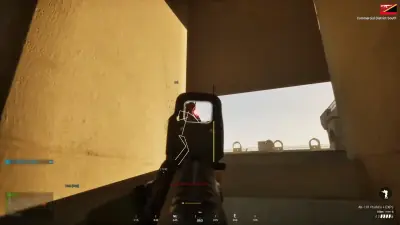
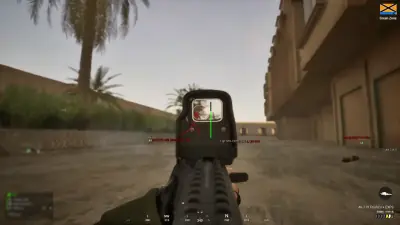
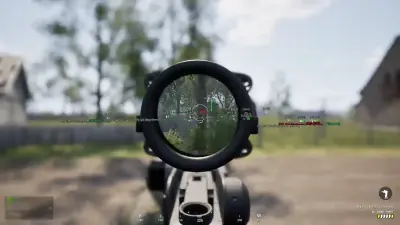
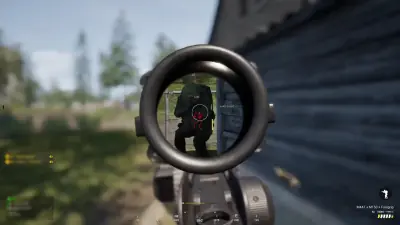
At a glance
Key capabilities
The short list for Squad Cheats, before the full module list.
Overview
Squad Cheats for PC
How the listed modules and the status banner fit a Squad match.
Explore Squad Cheats with customizable Aimbot, Player ESP, Object ESP, and additional gameplay options. Configure targeting settings, display player information, identify important battlefield objects, and personalize your cheat menu through flexible customization controls.
Squad Aimbot includes customizable activation modes, adjustable FOV, and selectable target bones. Fine-tune aim smoothness, targeting distance, and keybind settings through the dedicated configuration menu.
Explore Squad Cheats with customizable Aimbot, Player ESP, Object ESP, and additional gameplay options. Configure targeting settings, display player information, identify important battlefield objects, and personalize your cheat menu through flexible customization controls.
Squad Aimbot & Targeting Features
Squad Aimbot includes customizable activation modes, adjustable FOV, and selectable target bones. Fine-tune aim smoothness, targeting distance, and keybind settings through the dedicated configuration menu.
Available Aimbot options include:
- Hold and Toggle activation modes. - Customizable Aimbot keybind. - Adjustable FOV radius and FOV border. - Head, Neck, Body, and Legs selection. - Adjustable aim smoothness. - Configurable targeting distance.
Squad Player ESP & Visual Features
Customize player visibility through multiple ESP styles and character information indicators. Choose different box appearances, health displays, and additional visual elements to personalize your Player ESP configuration.
Available Player ESP options include:
- 2D Box and Corner Box ESP. - Static and Gradient Filled Boxes. - Multiple Health Bar styles. - Health Text and Nickname indicators. - Item in Hands display. - Line and Skeleton ESP. - Scope Zoom value. - Adjustable rendering distance.
Squad Object ESP & Vehicle Tracking
Identify important battlefield objects through dedicated HAB, FOB Radio, and Vehicle ESP options. Customize object distance, category information, and health indicators through individual display settings.
Available Object ESP options include:
- HAB Base ESP. - FOB Radio ESP. - Vehicle indicators. - Object Distance. - Category display. - Health Bar and Health Text. - Combined Text + Bar health display.
Squad Gameplay & Miscellaneous Features
Access additional combat, movement, and display options through the Miscellaneous menu. Customize weapon settings, ammunition indicators, movement options, and crosshair appearance.
Available options include:
- No Recoil and No Sway. - Unlimited Ammo and Unlimited RPG Shots. - Rapid Fire. - Speedhack and Big Player. - FOV Changer. - Custom Crosshair with Style, Size, and Thickness. - Ammo Count with Bar and Text display. - Out of Arrows indicator. - Battle Mode.
Squad Menu & Configuration Manager
Personalize the cheat interface with customizable themes, accent colors, language options, and display settings. Manage saved configurations through the built-in configuration manager.
Available interface options include:
- Light and Dark themes. - Custom Accent Colors. - English and Russian languages. - Particle Effects and VSync. - FPS Counter and DPI Scaling. - Watermark and Notification positioning. - Create, Delete, Save, and Load Configurations.
Windows Requirements & Compatibility
Squad Cheats supports Windows 10/11 with Intel and AMD processors.
Published system requirements include:
- HVCI enabled. - Core Isolation enabled. - TPM enabled. - Secure Boot enabled. - Cloud DMA required for full functionality.
**Anti-Cheat Consideration:** Squad uses Easy Anti-Cheat (EAC). Third-party cheat software may violate the game's terms and result in account or server restrictions. No third-party product can guarantee immunity from anti-cheat enforcement.
Modules
What's included
The full option list for Squad Cheats. Each line can be switched in the menu.
- Hold and toggle activation modes
- Adjustable FOV radius with visible FOV border
- Head, neck, body, and legs target selection
- Custom keybind configuration
- Adjustable aim smoothness
- Maximum targeting distance
- 2D and corner box ESP
- Filled boxes with static and gradient styles
- Health bars and health text
- Player nicknames
- Item currently held by players
- Skeleton display
- Distance-based rendering controls
- Scope zoom value display
- HAB base detection
- FOB radio detection
- Vehicle indicators
- Object distance display
- Category identification
- Object health bars and text
- Multiple health display styles
- No recoil and no sway options
- Unlimited ammunition
- Unlimited RPG shots
- Rapid fire functionality
- Adjustable player size
- Speedhack option
- Custom FOV settings
- Customizable crosshair style, size, and thickness
- Ammo count display
- Out of Arrows indicator with range and size settings
- Battle Mode
- Light and dark menu themes
- Custom accent colors
- Particle effects toggle
- English and Russian language options
- Adjustable DPI scaling
- VSync control
- FPS counter display
- Custom watermark position
- Notification position settings
- Create custom configurations
- Save current settings
- Load saved configurations
- Delete unwanted configurations
- Select between available configurations
Experience
Menu layers · After checkout
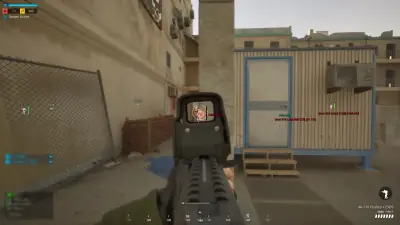
The supplied screenshots show Squad gameplay. Review documented features and purchase requirements below.
In-game layers
- Layer A
Squad gameplay 1
Owner-supplied Squad gameplay screenshot showing targeting and visual indicators.
- Layer B
Squad gameplay 2
Owner-supplied Squad gameplay screenshot showing targeting and visual indicators.
- Layer C
Squad gameplay 3
Owner-supplied Squad gameplay screenshot showing targeting and visual indicators.
- Layer D
Squad gameplay 4
Owner-supplied Squad gameplay screenshot showing targeting and visual indicators.
- Layer E
Squad gameplay 5
Owner-supplied Squad gameplay screenshot showing targeting and visual indicators.
More products
Pairs well with
Utilities sold beside the cheat. Each one keeps a separate page.
- HWID Spoofer After a hardware flag, this license rewrites disk serials. It also rewrites MAC addresses, GPU IDs, and related fingerprints. Trace cleanup is in the same license. View details: HWID Spoofer
- Cloud DMA Cloud DMA requires GREENWARD, Static Server and AWS as separate purchases. Confirm the full setup and Squad compatibility before ordering. View details: Cloud DMA
- Skin Changer Cosmetic customization for supported titles. Squad support is not explicitly confirmed; ask support before purchasing for this game. View details: Skin Changer
FAQ
Questions about this page
Answers for this page. The FAQ page holds the rest.
Blog
Related guides
Filter by topic to find setup guides, feature deep-dives, and patch-day notes.
Looking for Squad cheats for PC? Explore the available features, compatibility requirements, Cloud DMA integration, and important considerations before choosing a product.
Squad ESP offers additional visual information across tactical battlefields. Learn about player ESP, vehicle tracking, FOB detection, and the features worth evaluating.
Explore the role of aimbot software in Squad, the targeting considerations that matter, and the important compatibility details to review before purchasing.
Understand Cloud DMA for Squad, including its single-PC Hyper-V architecture, how it differs from traditional DMA hardware, and why compatibility matters.
Before purchasing Squad cheats, check the Windows version, security configuration, and Cloud DMA requirements. This guide explains the listed compatibility conditions.
Squad community forum
Read discussion
Read-only discussions supplied by the site owner. Archived compatibility notes and prices reflect their original dates; confirm current details with the seller.
- Squad Discussion What actually comes with the Squad cheat menu? A new player asks what the Squad menu actually includes. Members break down the listed player ESP, object ESP, aim options, miscellaneous settings, and config controls.
- Squad Discussion Player ESP vs Object ESP in Squad: what's the difference? Members explain the difference between player ESP options and object ESP options, including the separate indicator types listed for each.
- Squad Discussion What do the HAB, FOB radio and vehicle ESP options show? A member asks what is included in Object ESP. Replies clarify the listed HAB base, FOB radio, vehicle, distance, category, and health display options.
- Squad Discussion Can someone explain the Squad aimbot options without the jargon? A member asks what Hold/Toggle, FOV, bone selection, smoothness, distance, and keybind mean in the listed aimbot menu.